
September 24, 2026
If insurance feels clunky inside checkout or signup, the product structure is usually the problem. I’d fix it by splitting coverage into a base plan, add-ons, rules, pricing inputs, and bind controls - then matching each part to the point in the journey where it makes sense.
Here’s the short version:
A simple rule runs through the whole piece: one primary risk, one base module first. Then I’d add extra coverage only when the platform already has the data and the customer can understand the choice without friction.
A few facts stand out:
This article boils modular cover down to four steps: set the product as versioned configuration, place it in the right journey moment, separate pricing from issuance, and assign ownership before launch. If I were building embedded insurance into a U.S. platform, that’s the order I’d follow.
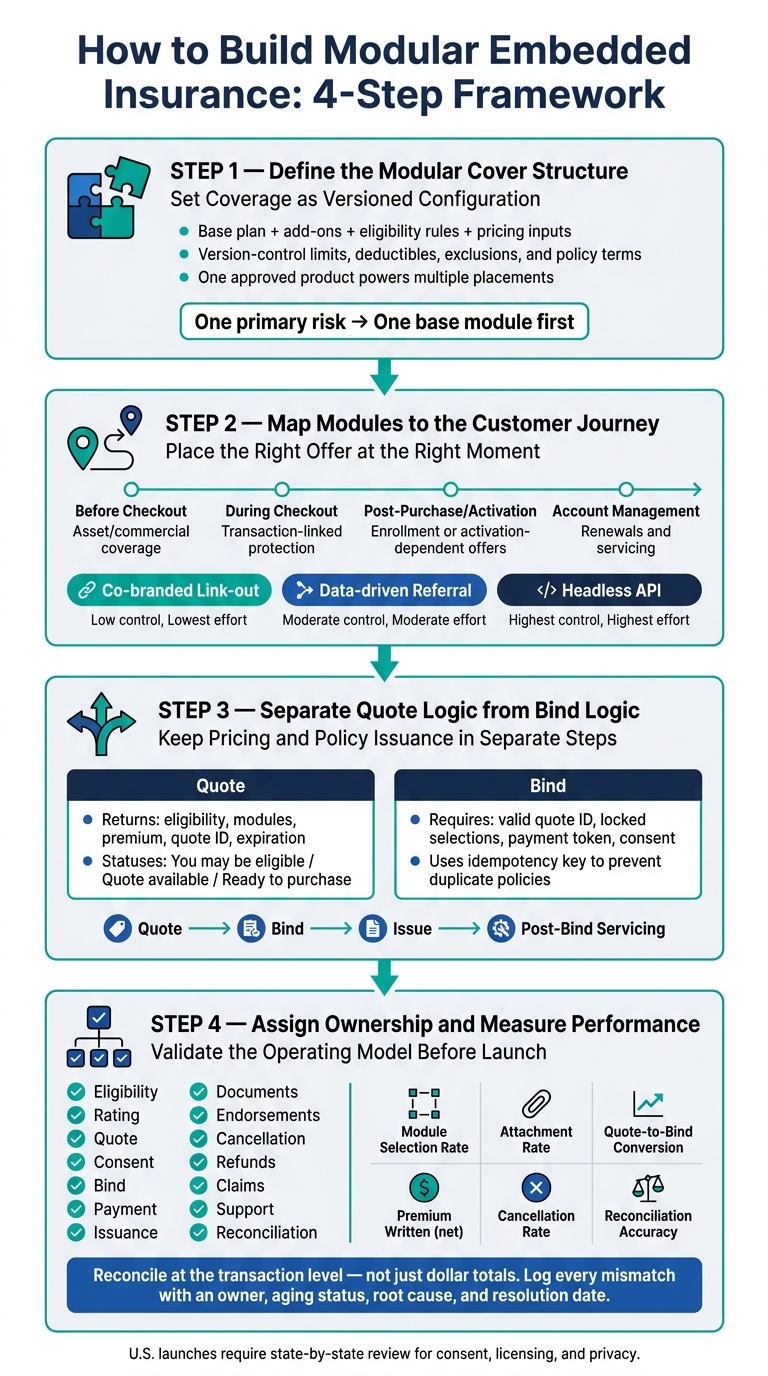
Modular Embedded Insurance: 4-Step Implementation Framework
Start by defining the insurance product as a version-controlled configuration before you decide where it shows up in the customer journey. Coverage, eligibility, pricing, and policy documents should all be set first.
Why does that matter? Because one approved product can then power multiple placements and unlock the power of embedded insurance without repeating insurance logic. The same approved coverage logic stays aligned across checkout, account, and post-purchase touchpoints. Once the product structure is locked in, map each module to the data and rules the platform needs to support.
A modular insurance product has several separate parts, and each one needs its own configuration. Every component should have a customer-facing description and a clear job that compliance, operations, and engineering can act on.
The main components are:
Structured coverage APIs can expose options like coverage limits, add-ons, and replacement-cost terms as discrete attributes.
Use this table as the source of truth for product, compliance, operations, and engineering.
| Coverage module | Risk addressed | Customer and transaction data | Eligibility dependency | Pricing impact | Customer-facing description | Bind requirement | Policy document output |
|---|---|---|---|---|---|---|---|
| Accidental damage | Repair or replacement after covered accidental damage | Item type, purchase value, purchase date | Eligible item and approved state | Base premium or rate on item value | Covers accidental damage after a covered event. | Requires customer acceptance, payment, and effective date. | Schedule showing limit, deductible, and terms |
| Theft protection | Theft of an eligible item | Item value, location, proof of purchase | Available only when item value is below the underwriting threshold and the customer provides item category and location | Optional premium | Adds protection if your eligible item is stolen. | Requires explicit customer selection and required disclosures. | Endorsement or coverage schedule |
| Liability | Third-party bodily injury or property damage | Activity type, location, transaction details | Approved use case and risk class | Rated premium and possible minimum | Helps protect against covered third-party claims. | Requires legal name, address, consent, and payment. | Policy or certificate showing liability limit |
Treat this table as versioned product metadata. If a deductible changes, an eligibility rule shifts, or a policy form is updated, the table should change too. That update should trigger review, not just a front-end edit.
With the module map in place, the next step is to put those options into the right stage of the journey.
Once the module map is in place, the next step is to line each use case up with the right module, data, placement, quote trigger, bind trigger, and servicing path. The goal is simple: show the right offer at the point where it makes sense.
A mapping matrix helps turn broad product ideas into day-to-day operating rules. Each row stands for a platform event or customer need. The columns answer the practical questions: What risk is in play? What module fits? What data is needed? Where should the offer appear? What starts a quote? What completes the bind? Who handles servicing or claims?
Here are five common embedded insurance use cases:
| Journey event or customer need | Relevant risk | Base coverage | Optional modules | Required data fields | Placement | Quote trigger | Bind trigger | Servicing or claims handoff |
|---|---|---|---|---|---|---|---|---|
| Booking or purchase completed | Cancellation, damage, interruption, or loss | Transaction protection | Assistance, baggage or item protection, upgraded limits | Transaction amount, dates, destination or item details, customer contact information | During checkout or immediately after purchase | Required transaction fields are complete | Customer accepts terms and completes payment | Carrier claims portal, partner support, or embedded claims intake |
| Vehicle, home, or device acquired | Physical damage, theft, or liability | Asset coverage | Roadside, replacement-cost, equipment breakdown, liability enhancements | Asset identifier, value, location, use, ownership, customer details | Before checkout, at activation, or at delivery | Asset data is submitted or validated | Asset purchase or activation is confirmed and premium is paid | Asset policy servicing and carrier claims process |
| Financial or software account activated | Fraud, identity theft, payment disruption, or account misuse | Account protection | Monitoring, assistance, payment protection, device coverage | Account status, customer identity, eligibility, product tier, consent | Account activation or account dashboard | Account becomes eligible or customer requests a quote | Enrollment consent and payment are completed | In-app service request, support team, or carrier |
| Employee, member, tenant, or subscriber enrollment | Shared group risk or personal protection gap | Group-sponsored benefit | Supplemental limits, dependents, voluntary benefits | Eligibility status, group ID, effective date, member information, elections | Enrollment window or benefits dashboard | Eligible person starts enrollment or changes an election | Enrollment is submitted and the effective date is confirmed | Group administrator, benefits team, or carrier |
| Business loan, property, shipment, or contractor workflow | Commercial property, liability, interruption, or contractual risk | Commercial package or required policy | Equipment, cyber, workers' compensation, hired/non-owned auto, business interruption | Legal entity, industry, location, revenue, payroll, assets, loan or contract terms | Application, quote review, or account management | Required underwriting fields pass validation | Customer accepts quote, completes payment, and satisfies underwriting controls | Broker, administrator, carrier service team, or commercial claims handler |
A good rule here: pick one primary risk and one base module first. Then add optional modules only if the platform already has the data to support them and the customer has a plain, easy-to-see need.
After that, placement and integration depth shape how the offer should show up.
Placement should match the risk, not just the screen space.
For review-heavy asset or commercial coverage, it often makes sense to place the offer before checkout. For simple transaction-linked protection, during checkout is usually the best fit. If eligibility depends on a completed action, like activation or enrollment, the offer may work better after purchase or activation. And when the job is renewals or servicing, account management is the natural home.
That timing matters. Offer too early, and the customer may not have enough context. Offer too late, and the need may have already passed.
Journey depth should track with underwriting complexity. A simple transaction-linked product may need nothing more than a short disclosure and a quote-and-bind step. A commercial or group product usually needs more steps, such as eligibility checks, enrollment logic, and document workflows.
Walnut Insurance supports three models - co-branded link-out, data-driven referral, and headless API. Each one comes with different trade-offs in interface control, data sharing, technical effort, module setup, and day-to-day ownership.
| Integration model | Customer interface control | Data sharing | Technical effort | Modular configuration flexibility | Operational responsibility |
|---|---|---|---|---|---|
| Co-branded link-out | Low to moderate; the customer leaves the platform for a branded insurance experience | Minimal; often limited to referral context | Lowest; little or no API development required | Limited; the insurance experience generally controls module presentation | Insurance provider or partner manages most quoting, binding, documents, and servicing |
| Data-driven referral | Moderate; the platform controls the entry point while the insurance flow is usually hosted elsewhere | Basic customer and transaction data can prefill the application | Moderate; secure data transfer and referral tracking are required | Moderate; the platform can pass use-case-specific data and route customers to an appropriate product | Shared; the platform owns referral context and the insurance provider owns the insurance workflow |
| Headless API | Highest; quote, bind, documents, and potentially servicing can remain inside the platform interface | Broad, structured data exchange subject to consent, security, and compliance controls | Highest; requires API orchestration, error handling, testing, monitoring, and lifecycle management | Highest; the platform can select and display modules dynamically by use case | Shared or platform-led; the platform must support customer experience, while the insurance provider remains responsible for insurance operations and regulated functions |
In plain terms, a shallow journey works when the risk is simple and existing transaction data can support pricing. A deeper journey makes more sense when eligibility, policy documents, payment, or servicing need to stay inside the platform.
API-based embedded insurance often splits eligibility, quote generation, binding, document delivery, policy management, and first-notice-of-loss into separate capabilities.[1]
Once placement is set, the next job is to separate quote logic from bind logic.
Once placement is set, keep pricing separate from policy issuance. A quote tells the customer the estimated price and whether they can get coverage. A bind turns an accepted, still-valid quote into a policy.
The quote path should move in a simple, clear order. Start with the data the platform already has - transaction value, customer location, item details, effective date - and run eligibility checks in the background. Then return the base coverage and any optional modules the customer qualifies for, apply underwriting and pricing rules, and show the premium with the coverage terms and required disclosures.
If the customer changes a module, recalculate the quote and create a new version. Keep earlier versions for audit, but only the current unexpired quote should be allowed to bind. And don’t version only the premium. The module selections need to be versioned inside the quote record too. Each quote should also include a unique ID, a timestamp, and a clear expiration time so the bind step can tell, with no guesswork, whether the offer is still valid.
Not every quote works the same way. That’s where teams often get tripped up.
Use these customer-facing statuses:
Bind should begin only after the customer clearly accepts a valid, unexpired quote. Before bind, recheck eligibility, lock selections, confirm payment authorization, and capture disclosures and consent. Only after that should the bind request go through.
Use lifecycle stages so quote, bind, issue, and servicing each have their own lane.
| Lifecycle stage | Trigger | Required inputs | System response | Customer-facing status | Failure-handling responsibility |
|---|---|---|---|---|---|
| Quote | Customer opens the offer or changes a module | Platform data, customer answers, selected modules, effective date | Eligibility decision, available modules, premium, terms, quote ID, expiration | "Quote ready", "More information required", "Referred", or "Not available" | Platform collects missing data; insurer or underwriting engine handles referral and decline |
| Bind | Customer accepts the quote and submits the bind request | Valid quote ID/version, locked selections, payment token, disclosures, consent, effective date | Bind confirmation, pending result, or rejection | "Confirming coverage", "Payment authorization required", "Binding in progress", "Unable to bind", or "Coverage confirmed" | Platform handles customer completion and retries; insurance operations or carrier team handles eligibility, payment, compliance, and duplicate-submission issues |
| Issue | Successful bind or explicit issuance request | Bound policy record, document data, billing details, required forms | Policy number, declarations, certificate, document status | "Policy issued", "Documents ready", or "Issuance delayed" | Policy administration or carrier team resolves document, policy-record, and downstream-system failures |
| Post-bind servicing | Customer requests a change, cancellation, renewal, document, or claim-related action | Policy ID, authenticated customer context, requested change, supporting data | Endorsement, cancellation, renewal, document retrieval, or service case | "Active", "Pending cancellation", "Canceled", "Endorsement requested", "Renewal pending", or "Service request open" | Servicing team, administrator, broker, or carrier handles the request according to the agreed model |
Add two controls from day one. First, put an idempotency key on every bind request so a network timeout or a customer retry doesn’t create two policies from the same quote. Second, keep payment authorization separate from policy issuance in the system model. A payment may be authorized while issuance is still pending, and each result needs its own recovery path.
With quote and bind split apart, the operating model can assign clear ownership for issuance, servicing, and exceptions.
Once quote and bind logic is set, give each operating step to a specific person or team. A product can work on the front end and still fail in servicing, reconciliation, or compliance. That’s the trap. Modular offers work in embedded flows only when the operating model is just as modular.
Run a go/no-go review with product, underwriting, compliance, engineering, finance, support, and the carrier or delegated authority. For each coverage module, confirm that eligibility criteria, rating inputs, limits, exclusions, deductibles, effective dates, state availability, and document wording are versioned and approved for launch.
Each module needs the same level of clarity as the product design. Assign one owner to each stage:
Then test the failure paths that tend to break a launch. Go end to end and check cases like an ineligible applicant, no quote, an expired quote, abandoned checkout, payment failure, bind failure after payment, document-delivery failure, a duplicate bind request, a cancellation or refund, and a midterm module change.
Each exception needs four things:
Get state-by-state sign-off on licensing, consent, and privacy. One national disclosure flow will not satisfy launch-state rules.
After ownership is assigned, set the metrics that show whether the program is doing its job. Before release, align on one metric dictionary. The core metrics to track are module selection rate, attachment rate, quote-to-bind conversion by module, state, device, and failure reason, premium written net of cancellations, refunds, taxes, and fees, cancellation rate by timing and reason, and reconciliation accuracy across policy, payment, premium tax, and commission records.
These numbers tell you whether modular placement, quote logic, and bind control are holding up in production.
Reconcile each bound policy against payment, remittance, commission, and general-ledger records at the transaction level. Log every mismatch with an owner, aging status, root cause, and resolution date. Reconcile daily during the initial launch period, then change frequency based on transaction volume and risk.
Aggregate dollar totals alone will hide duplicate binds, missing commissions, and tax errors. Check by transaction ID and policy number every time.
When ownership and measurement are clear, the modular offer can launch without operational confusion. The approach in this guide comes down to four decisions made in the right order: define coverage as configurable modules with versioned rules, map those modules to actual platform use cases and customer journey moments, separate quote logic from bind logic with clear lifecycle controls, and validate the full operating model before launch.
Modular cover fits embedded insurance only when product structure, placement, quote logic, bind control, and operating ownership line up. Walnut Insurance supports these embedded insurance implementation paths, but governance, servicing, and reconciliation still need clear ownership before launch.
Separating quote and bind gives platforms tighter control over the customer journey. The quote step delivers immediate, data-driven pricing based on transaction details, which helps hold a customer’s interest with very little friction.
Keeping bind as a separate step lets businesses fit insurance into checkout or onboarding in a natural way. That means customers can finish coverage only after they’ve had a chance to review the personalized offer.
Choose journey placement by finding the digital touchpoints where users are most engaged and insurance feels like a natural fit. Common spots include the purchase flow, account setup, and post-purchase moments.
Use data such as demographics, purchase history, and platform usage to match products with the right user segments. Then fine-tune placement through A/B testing, timing and messaging tests, and close tracking of quote abandonment.
Before launch, teams should have a clear handle on a few core areas.
Walnut can support licensing, compliance, and much of the insurance workflow.